Models
Typical public AI chatbot: One vendor's models
NeutralModel enterprise AI workspace: Every leading AI model through one interface
Your data. Your infrastructure. Complete control.
One interface for every leading AI model.
Who can use which AI, on what data — with a record of everything.
See where your AI spend goes — and cap it.
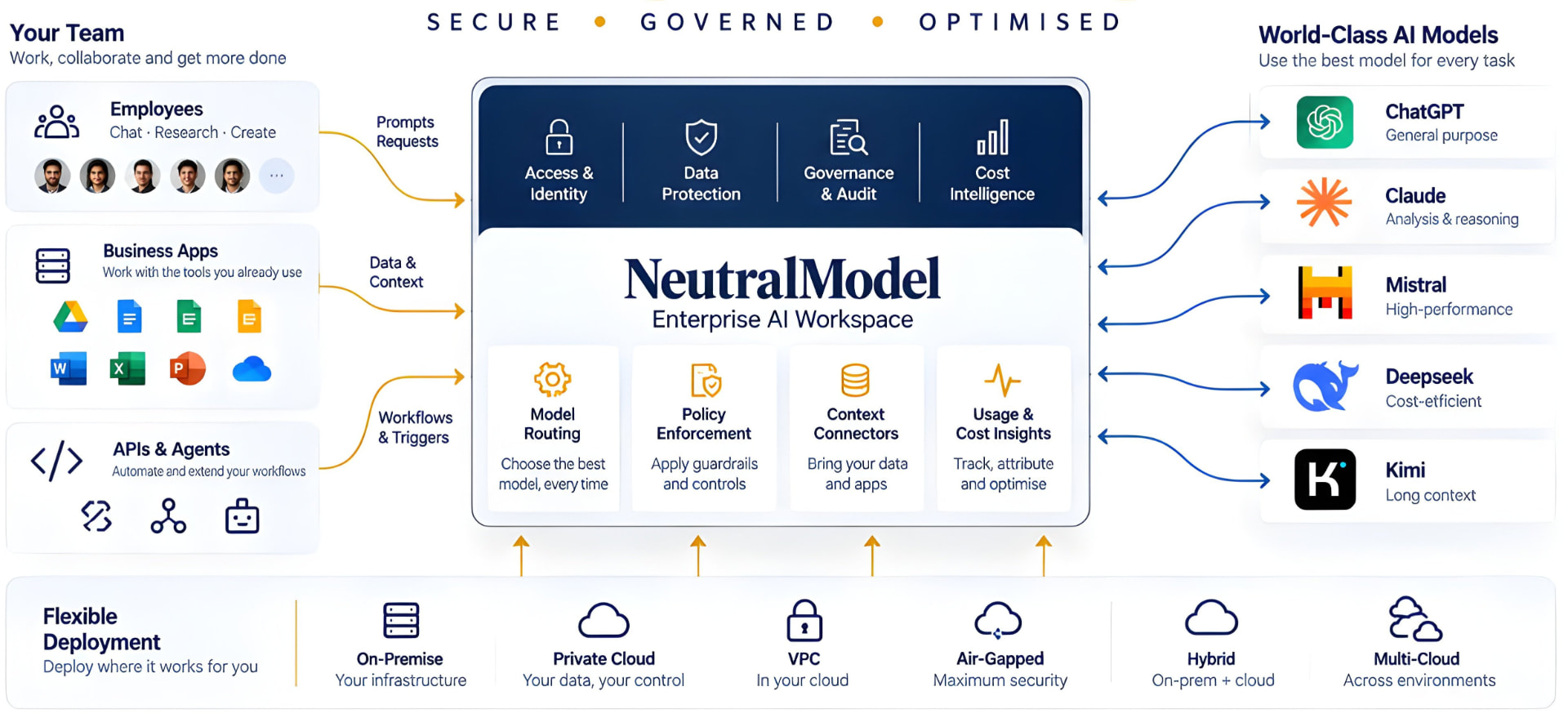
An enterprise AI workspace is one company-controlled place where employees use AI models while IT governs security, access, cost and audit in a single layer. NeutralModel is an AI workspace for teams across the company, and one enterprise AI platform for every model: a chat interface and an API for people, and admin controls for the business.
The NeutralModel Difference
A chatbot is a tool one person uses. An AI workspace is a system a company runs.
Typical public AI chatbot: One vendor's models
NeutralModel enterprise AI workspace: Every leading AI model through one interface
Typical public AI chatbot: Personal accounts
NeutralModel enterprise AI workspace: Company SSO and a registered device
Typical public AI chatbot: Staff decide what to paste
NeutralModel enterprise AI workspace: PII redaction and company keyword masking before data leaves
Typical public AI chatbot: None for the company
NeutralModel enterprise AI workspace: Immutable AI audit trail
Typical public AI chatbot: Separate licences, no central view
NeutralModel enterprise AI workspace: AI budget controls per user and per model
Typical public AI chatbot: The vendor
NeutralModel enterprise AI workspace: Your admins
The request flow
Every prompt, from every employee and every API call, passes the same four steps before an answer comes back.
The employee signs in with company SSO for AI tools from a registered device, locked with WebAuthn. Role-based access control for AI decides which models and features they can use.
PII redaction for AI, sensitive data masking, company keyword masking and hard-block policies run before the prompt leaves your environment, with prompt-injection defences applied.
The model your admin approved for this person and this type of work responds, within budget. If that model or provider fails, a fallback takes over and the conversation context carries across. Harmful answers are blocked, logged and flagged to admins.
The interaction is written to the immutable AI audit trail and counted against the user's budget. If the audit record cannot be written, the answer is withheld.
Self-Hosted AI
Each customer runs a dedicated NeutralModel deployment, delivered as a container image, on infrastructure you choose. Once delivered, it is fully in your hands: nothing is sent to NeutralModel, and NeutralModel has no access to it or visibility into it.
Security updates ship as a new container image. Download it, export the audit log from the old deployment, load it into the new one and carry on. Context and controls carry over, and earlier audit logs stay intact and untouched.
Multi-Model AI
NeutralModel is a multi-LLM platform with one interface for every LLM and every leading AI model, and no vendor lock-in. Your admins, not a vendor, decide who uses what.
AI Governance
AI governance in NeutralModel is enforced in the workspace itself, not left to a policy document. It is a governed AI workspace with centralized control of AI usage across every team and every model.
People use shadow AI when approved tools are costly or missing. An approved workspace that is easy to use and affordable gives them no reason to go around it, and ends AI sprawl.
Cost Intelligence
AI cost optimization comes from two things: the right model for each task, and a limit on spend that is enforced, not hoped for. Enterprises can reduce AI costs by up to 50% (an estimate that varies with usage).
Teams comparing a ChatGPT Enterprise alternative or a Microsoft Copilot alternative usually want three things: a choice of models, control over where data lives, and spend they can cap per person. NeutralModel is built around those three.
An LLM gateway or AI gateway is developer infrastructure that sits behind applications. NeutralModel is an enterprise AI workspace: a chat interface for employees, API access for developers, and admin controls over both.
Seven questions separate an enterprise AI workspace from a chatbot with a login.
Deployment control
Self-hosted AI platform: on-premise, private cloud, VPC or air-gapped
Model choice
Multi-model AI with no vendor lock-in and admin-defined model access
Identity
SSO, WebAuthn device binding and role-based access control
Data protection
PII redaction, company keyword masking, hard-block policies and DLP
Audit
Immutable audit logs and a full AI audit trail, with retention you set
Cost control
AI budget controls per user and per model, with AI usage analytics
Resilience
LLM fallback and failover, with context carried across
NeutralModel is built for teams where a leak costs more than a licence.
Client names and deal terms are masked before a prompt leaves, and every use is logged.
Patient identifiers are masked as PII, and a self-hosted deployment keeps data in your environment.
Policyholder data is masked and every interaction can be audited.
Air-gapped deployment for sensitive programmes.
Design IP and company keywords are blocked from leaving.
Frequently Asked Questions
One login, one interface and one audit trail for every model. Self-hosted in your environment, governed by your admins, and priced by what your people actually use.